 双旋网络
双旋网络 java实现FTP文件上传与文件下载

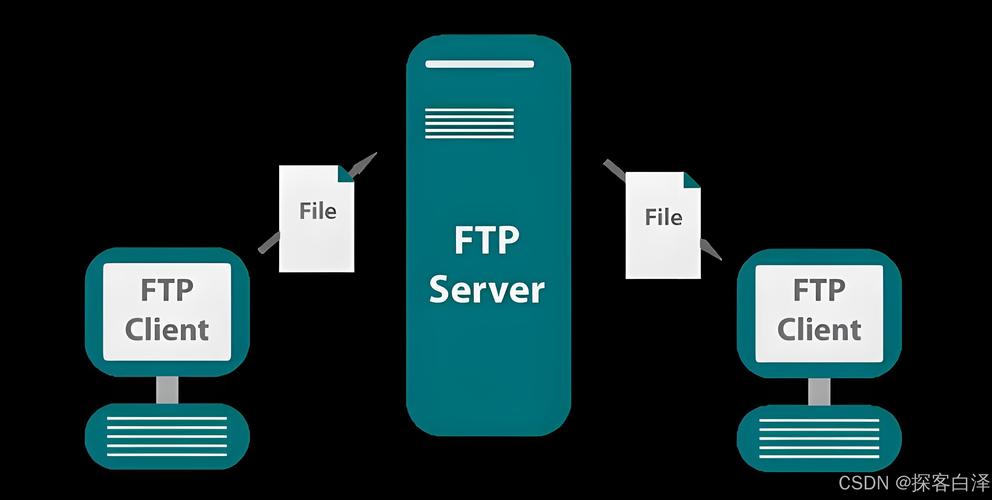
本文实例为大家分享了两种java实现FTP文件上传下载的方式,供大家参考,具体内容如下
第一种方式:
packagecom.cloudpower.util;
importjava.io.File;
importjava.io.FileInputStream;
importjava.io.FileOutputStream;
importjava.io.IOException;
importsun.net.TelnetInputStream;
importsun.net.TelnetOutputStream;
importsun.net.ftp.FtpClient;
/**
*Java自带的API对FTP的操作
*@Title:Ftp.java
*@author:周玲斌
*/
publicclassFtp{
/**
*本地文件名
*/
privateStringlocalfilename;
/**
*远程文件名
*/
privateStringremotefilename;
/**
*FTP客户端
*/
privateFtpClientftpClient;
/**
*服务器连接
*@paramip服务器IP
*@paramport服务器端口
*@paramuser用户名
*@parampassword密码
*@parampath服务器路径
*@author周玲斌
*@date2012-7-11
*/
publicvoidconnectServer(Stringip,intport,Stringuser,
Stringpassword,Stringpath){
try{
/*******连接服务器的两种方法*******/
//第一种方法
//ftpClient=newFtpClient();
//ftpClient.openServer(ip,port);
//第二种方法
ftpClient=newFtpClient(ip);
ftpClient.login(user,password);
//设置成2进制传输
ftpClient.binary();
System.out.println("loginsuccess!");
if(path.length()!=0){
//把远程系统上的目录切换到参数path所指定的目录
ftpClient.cd(path);
}
ftpClient.binary();
}catch(IOExceptionex){
ex.printStackTrace();
thrownewRuntimeException(ex);
}
}
/**
*关闭连接
*@author周玲斌
*@date2012-7-11
*/
publicvoidcloseConnect(){
try{
ftpClient.closeServer();
System.out.println("disconnectsuccess");
}catch(IOExceptionex){
System.out.println("notdisconnect");
ex.printStackTrace();
thrownewRuntimeException(ex);
}
}
/**
*上传文件
*@paramlocalFile本地文件
*@paramremoteFile远程文件
*@author周玲斌
*@date2012-7-11
*/
publicvoidupload(StringlocalFile,StringremoteFile){
this.localfilename=localFile;
this.remotefilename=remoteFile;
TelnetOutputStreamos=null;
FileInputStreamis=null;
try{
//将远程文件加入输出流中
os=ftpClient.put(this.remotefilename);
//获取本地文件的输入流
Filefile_in=newFile(this.localfilename);
is=newFileInputStream(file_in);
//创建一个缓冲区
byte[]bytes=newbyte[1024];
intc;
while((c=is.read(bytes))!=-1){
os.write(bytes,0,c);
}
System.out.println("uploadsuccess");
}catch(IOExceptionex){
System.out.println("notupload");
ex.printStackTrace();
thrownewRuntimeException(ex);
}finally{
try{
if(is!=null){
is.close();
}
}catch(IOExceptione){
e.printStackTrace();
}finally{
try{
if(os!=null){
os.close();
}
}catch(IOExceptione){
e.printStackTrace();
}
}
}
}
/**
*下载文件
*@paramremoteFile远程文件路径(服务器端)
*@paramlocalFile本地文件路径(客户端)
*@author周玲斌
*@date2012-7-11
*/
publicvoiddownload(StringremoteFile,StringlocalFile){
TelnetInputStreamis=null;
FileOutputStreamos=null;
try{
//获取远程机器上的文件filename,借助TelnetInputStream把该文件传送到本地。
is=ftpClient.get(remoteFile);
Filefile_in=newFile(localFile);
os=newFileOutputStream(file_in);
byte[]bytes=newbyte[1024];
intc;
while((c=is.read(bytes))!=-1){
os.write(bytes,0,c);
}
System.out.println("downloadsuccess");
}catch(IOExceptionex){
System.out.println("notdownload");
ex.printStackTrace();
thrownewRuntimeException(ex);
}finally{
try{
if(is!=null){
is.close();
}
}catch(IOExceptione){
e.printStackTrace();
}finally{
try{
if(os!=null){
os.close();
}
}catch(IOExceptione){
e.printStackTrace();
}
}
}
}
publicstaticvoidmain(Stringagrs[]){
Stringfilepath[]={"/temp/aa.txt","/temp/regist.log"};
Stringlocalfilepath[]={"C:\tmp\1.txt","C:\tmp\2.log"};
Ftpfu=newFtp();
/*
*使用默认的端口号、用户名、密码以及根目录连接FTP服务器
*/
fu.connectServer("127.0.0.1",22,"anonymous","IEUser@","/temp");
//下载
for(inti=0;i<filepath.length;i++){
fu.download(filepath[i],localfilepath[i]);
}
Stringlocalfile="E:\号码.txt";
Stringremotefile="/temp/哈哈.txt";
//上传
fu.upload(localfile,remotefile);
fu.closeConnect();
}
}
这种方式没啥可说的,比较简单,也不存在中文乱码的问题。貌似有个缺陷,不能操作大文件java怎么上传txt文件到ftp上,有兴趣的朋友可以试试。
第二种方式:
publicclassFtpApche{
privatestaticFTPClientftpClient=newFTPClient();
privatestaticStringencoding=System.getProperty("file.encoding");
/**
*Description:向FTP服务器上传文件
*
*@Version1.0
*@paramurl
*FTP服务器hostname
*@paramport
*FTP服务器端口
*@paramusername
*FTP登录账号
*@parampassword
*FTP登录密码
*@parampath
*FTP服务器保存目录,如果是根目录则为“/”
*@paramfilename
*上传到FTP服务器上的文件名
*@paraminput
*本地文件输入流
*@return成功返回true,否则返回false
*/
publicstaticbooleanuploadFile(Stringurl,intport,Stringusername,
Stringpassword,Stringpath,Stringfilename,InputStreaminput){
booleanresult=false;
try{
intreply;
//如果采用默认端口,可以使用ftp.connect(url)的方式直接连接FTP服务器
ftpClient.connect(url);
//ftp.connect(url,port);//连接FTP服务器
//登录
ftpClient.login(username,password);
ftpClient.setControlEncoding(encoding);
//检验是否连接成功
reply=ftpClient.getReplyCode();
if(!FTPReply.isPositiveCompletion(reply)){
System.out.println("连接失败");
ftpClient.disconnect();
returnresult;
}
//转移工作目录至指定目录下
booleanchange=ftpClient.changeWorkingDirectory(path);
ftpClient.setFileType(FTP.BINARY_FILE_TYPE);
if(change){
result=ftpClient.storeFile(newString(filename.getBytes(encoding),"iso-8859-1"),input);
if(result){
System.out.println("上传成功!");
}
}
input.close();
ftpClient.logout();
}catch(IOExceptione){
e.printStackTrace();
}finally{
if(ftpClient.isConnected()){
try{
ftpClient.disconnect();
}catch(IOExceptionioe){
}
}
}
returnresult;
}
/**
*将本地文件上传到FTP服务器上
*
*/
publicvoidtestUpLoadFromDisk(){
try{
FileInputStreamin=newFileInputStream(newFile("E:/号码.txt"));
booleanflag=uploadFile("127.0.0.1",21,"zlb","123","/","哈哈.txt",in);
System.out.println(flag);
}catch(FileNotFoundExceptione){
e.printStackTrace();
}
}
/**
*Description:从FTP服务器下载文件
*
*@Version1.0
*@paramurl
*FTP服务器hostname
*@paramport
*FTP服务器端口
*@paramusername
*FTP登录账号
*@parampassword
*FTP登录密码
*@paramremotePath
*FTP服务器上的相对路径
*@paramfileName
*要下载的文件名
*@paramlocalPath
*下载后保存到本地的路径
*@return
*/
publicstaticbooleandownFile(Stringurl,intport,Stringusername,
Stringpassword,StringremotePath,StringfileName,
StringlocalPath){
booleanresult=false;
try{
intreply;
ftpClient.setControlEncoding(encoding);
/*
*为了上传和下载中文文件,有些地方建议使用以下两句代替
*newString(remotePath.getBytes(encoding),"iso-8859-1")转码。
*经过测试,通不过。
*/
//FTPClientConfigconf=newFTPClientConfig(FTPClientConfig.SYST_NT);
//conf.setServerLanguageCode("zh");
ftpClient.connect(url,port);
//如果采用默认端口,可以使用ftp.connect(url)的方式直接连接FTP服务器
ftpClient.login(username,password);//登录
//设置文件传输类型为二进制
ftpClient.setFileType(FTPClient.BINARY_FILE_TYPE);
//获取ftp登录应答代码
reply=ftpClient.getReplyCode();
//验证是否登陆成功
if(!FTPReply.isPositiveCompletion(reply)){
ftpClient.disconnect();
System.err.println("FTPserverrefusedconnection.");
returnresult;
}
//转移到FTP服务器目录至指定的目录下
ftpClient.changeWorkingDirectory(newString(remotePath.getBytes(encoding),"iso-8859-1"));
//获取文件列表
FTPFile[]fs=ftpClient.listFiles();
for(FTPFileff:fs){
if(ff.getName().equals(fileName)){
FilelocalFile=newFile(localPath+"/"+ff.getName());
OutputStreamis=newFileOutputStream(localFile);
ftpClient.retrieveFile(ff.getName(),is);
is.close();
}
}
ftpClient.logout();
result=true;
}catch(IOExceptione){
e.printStackTrace();
}finally{
if(ftpClient.isConnected()){
try{
ftpClient.disconnect();
}catch(IOExceptionioe){
}
}
}
returnresult;
}
/**
*将FTP服务器上文件下载到本地
*
*/
publicvoidtestDownFile(){
try{
booleanflag=downFile("127.0.0.1",21,"zlb",
"123","/","哈哈.txt","D:/");
System.out.println(flag);
}catch(Exceptione){
e.printStackTrace();
}
}
publicstaticvoidmain(String[]args){
FtpApchefa=newFtpApche();
fa.testDownFile();
}
}
这种方式的话需要注意中文乱码问题啦,如果你设置不恰当,有可能上传的文件名会为乱码,有的时候根本就上传不上去,当然,也不会跟你提示,因为原本就没异常。在网上找了好多解答方案,众说纷纭,几乎都是从一个版本拷贝过去的,也没有经过自己的真是检验。为此,也吃了不少苦头。大致分为以下两种解决方案:
1、加上以下三句即可解决
.(“GBK”);
=(.);
conf.e(“zh”);
解答:经过测试,根本上行不通,上述问题依然存在
2、与上述方式有所类似,但我觉得这种方式更靠谱一点
首先,加上.(“GBK”);这一句,然后,将所有的中文进行转码为“ISO-8859-1”格式,如下:
.ry((.(“GBK”),”iso-8859-1″));
解答:经过测试java怎么上传txt文件到ftp上,仍然行不通,之所以我说此方式更靠谱一点,请继续往下看
首先我们来说说为什么要进行转码:
因为在FTP协议里面java实现FTP文件上传与文件下载,规定文件名编码为iso-8859-1,所以目录名或文件名需要转码。
接下来的问题是,我们应该将什么编码转换为此格式。因此,就有了第二种解决方案——把GBK格式的转换为ISO-8859-1格式。而且,有的人还说,必须得这么转。其实,之所以他们能这么说,我觉得完全是巧合。它的真正原理是,既然FTP协议规定的编码格式是“ISO-8859-1”,那么我们确实得将格式转换一下java怎么上传txt文件到ftp上,然后等服务器收到文件时再自动转换为系统自带的编码格式,因此,关键不是规定为什么格式,而是取决于FTP服务器的编码格式。因此java实现FTP文件上传与文件下载,如果FTP系统的编码格式为“GBK”时,第二种方式肯定会成功;但是,如果系统的编码格式为“UTF-8”时,那就会仍然出现乱码啦。所以,我们只能通过代码先获取系统的编码格式,然后通过此编码格式转换为ISO-8859-1的编码格式。获取方式如下:
=.(“file.”);
以上代码均通过自己测试,望能为大家解决一下问题!
1. 本站所有资源来源于用户上传和网络,如有侵权请联系站长!
2. 分享目的仅供大家学习和交流,您必须在下载后24小时内删除!
3. 不得使用于非法商业用途,不得违反国家法律。否则后果自负!
4. 本站提供的源码、模板、插件等等其他资源,都不包含技术服务请大家谅解!
5. 如有链接无法下载、失效或广告,请联系站长处理!
6. 本站不售卖代码,资源标价只是站长收集整理的辛苦费!如果您喜欢该程序,请支持正版软件,购买注册,得到更好的正版服务。
7. 站长QQ号码 2205675299
资源库 - 资源分享下载网 » java实现FTP文件上传与文件下载

常见问题FAQ
- 关于资源售价和售后服务的说明?
- 代码有没有售后服务和技术支持?
- 有没有搭建服务?
- 链接地址失效了怎么办?
- 关于解压密码