
 双旋网络
双旋网络 CSS+js实现图片淡入淡出幻灯片轮播效果

本文介绍一个CSS+js实现的图片淡入淡出轮播效果的幻灯片实例,可点击或自动轮播。
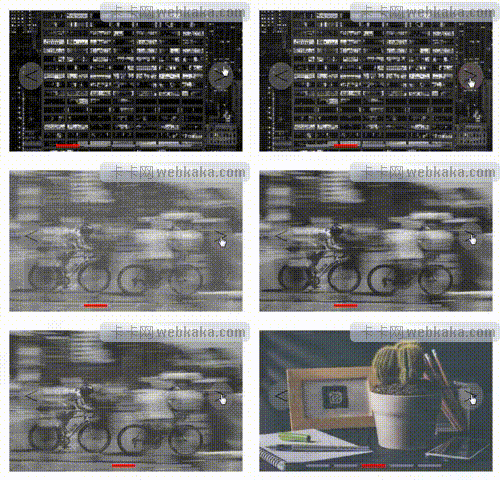
功能介绍


div标签是轮播区域盒子,在CSS中定义其位置、高度、宽度等样式。
ul li列表标签是轮播的图片。

两个span标签是向左和向右的箭头js幻灯片轮播代码,其作用是当鼠标点击它可向左或向右切换图片。
5个a标签,是轮播底部的5个小横条。点击小横条可切换图片。
CSS
div {
    margin: 100 px auto;
    width: 500 px;
    height: 300 px;
    position: relative;
}
ul {
    position: relative;
}
li {
    list - style: none;
    position: absolute;
    opacity: 0;
    transition - duration: 3 s;
}
li: first - child {
    opacity: 1;
}
img {
    width: 500 px;
    height: 300 px;
}
div: hover span {
    display: block;
}
span {
    position: absolute;
    font - size: 50 px;
    cursor: pointer;
    display: none;
    background - color: grey;
    border - radius: 50 % ;
    opacity: 0.5;
}
span: first - of - type {
    left: 20 px;
    top: 110 px;
}
span: last - of - type {
    right: 20 px;
    top: 110 px;
}
a {
    position: absolute;
    width: 50 px;
    height: 5 px;
    background - color: grey;
    cursor: pointer;
}
a: first - of - type {
    bottom: 10 px;
    left: 100 px;
    background - color: red;
}
a: nth - of - type(2) {
    bottom: 10 px;
    left: 160 px;
}
a: nth - of - type(3) {
    bottom: 10 px;
    left: 220 px;
}
a: nth - of - type(4) {
    bottom: 10 px;
    left: 280 px;
}
a: nth - of - type(5) {
    bottom: 10 px;
    left: 340 px;
}
div是轮播区域盒子,CSS定义其位置、高度、宽度等样式。
li是定义轮播图片的列表样式。
span定义向左向右箭头的样式。
a定义底部小横条的样式。
a:nth-of-type(n) n值为2-4js幻灯片轮播代码,是定义5张图片的位置。如果你的轮播图片多于5张,可以参考实例加多n个a:nth-of-type(n)CSS+js实现图片淡入淡出幻灯片轮播效果,需要注意的是left属性值的递增数值是60。
JS
let num = 0;
let timer;

function AddTimer(num) {
    timer = setInterval(() => {
        ChangePic(num);
        num++;
        if(num == 5) {
            num = 0;
        }
    }, 3000);
}

function ChangePic(num) {
    for(let i of document.querySelectorAll("li")) {
        i.style.opacity = "0";
    }
    toRed(num);
    document.querySelectorAll("li")[num].style.opacity = "1";
}

function toRed(num) {
    for(let i of document.querySelectorAll("a")) {
        i.style.backgroundColor = "grey";
    }
    document.querySelectorAll("a")[num].style.backgroundColor = "red";
}
AddTimer(num);
// 小圆点
for(let i = 0; i < document.querySelectorAll("a").length; i++) {
    console.log(i);
    document.querySelectorAll("a")[i].addEventListener("click", () => {
        num = i;
        ChangePic(num);
    })
}
// 左
document.querySelector(".left").addEventListener("click", () => {
        num--;
        if(num == -1) {
            num = 4;
        }
        console.log(num);
        ChangePic(num);
    })
    // 右
document.querySelector(".right").addEventListener("click", function() {
        num++;
        if(num == 5) {
            num = 0;
        }
        console.log(num);
        ChangePic(num);
    })
    //  鼠标移入移开
document.querySelector("div").addEventListener("mouseover", () => {
    clearInterval(timer);
})
document.querySelector("div").addEventListener("mouseout", () => {
    AddTimer(num);
})
(num)是一个计时器js幻灯片轮播代码,可以设定图片轮播间隔时间,实例里的轮播间隔时间是3s。
(num)是切换图片函数CSS+js实现图片淡入淡出幻灯片轮播效果,先把所有图片透明度设为0,再把当前轮播的图片透明度设为1。
toRed(num)是小横条颜色设置函数,先把所有小横条颜色设为grey,再把当前轮播的图片小横条颜色设为red。
总结
本文介绍了一个CSS+js实现的图片淡入淡出轮播效果的幻灯片实例,实例代码清晰易懂易修改,在很多网站都有使用。
您可能对以下文章也感兴趣
公告:
1. 本站所有资源来源于用户上传和网络,如有侵权请联系站长!
2. 分享目的仅供大家学习和交流,您必须在下载后24小时内删除!
3. 不得使用于非法商业用途,不得违反国家法律。否则后果自负!
4. 本站提供的源码、模板、插件等等其他资源,都不包含技术服务请大家谅解!
5. 如有链接无法下载、失效或广告,请联系站长处理!
6. 本站不售卖代码,资源标价只是站长收集整理的辛苦费!如果您喜欢该程序,请支持正版软件,购买注册,得到更好的正版服务。
7. 站长QQ号码 2205675299
资源库 - 资源分享下载网 » CSS+js实现图片淡入淡出幻灯片轮播效果
1. 本站所有资源来源于用户上传和网络,如有侵权请联系站长!
2. 分享目的仅供大家学习和交流,您必须在下载后24小时内删除!
3. 不得使用于非法商业用途,不得违反国家法律。否则后果自负!
4. 本站提供的源码、模板、插件等等其他资源,都不包含技术服务请大家谅解!
5. 如有链接无法下载、失效或广告,请联系站长处理!
6. 本站不售卖代码,资源标价只是站长收集整理的辛苦费!如果您喜欢该程序,请支持正版软件,购买注册,得到更好的正版服务。
7. 站长QQ号码 2205675299
资源库 - 资源分享下载网 » CSS+js实现图片淡入淡出幻灯片轮播效果

常见问题FAQ
- 关于资源售价和售后服务的说明?
- 代码有没有售后服务和技术支持?
- 有没有搭建服务?
- 链接地址失效了怎么办?
- 关于解压密码



![[.net编程自学网]JavaScript DOM编程(一)](/wp-content/uploads/2026/04/1777004058768_0.jpg)