 双旋网络
双旋网络 Java微信公众平台开发(一)–接入微信公众平台

<p style="margin: 1.25em 0; line-height: 1.9; font-size: 16px; color: #222222; text-align: justify; letter-spacing: 0.02em;”>今天正式开始微信公众平台的二次开发。网上有很多的及射入微信公众平台的教程。总的来说都差不多,当了解了接入流程解析,什么都显得理所当然。
<p style="margin: 1.25em 0; line-height: 1.9; font-size: 16px; color: #222222; text-align: justify; letter-spacing: 0.02em;”>所以我们还是先看微信给出的官网文档吧:
<p style="margin: 1.25em 0; line-height: 1.9; font-size: 16px; color: #222222; text-align: justify; letter-spacing: 0.02em;”>地址:
<p style="margin: 1.25em 0; line-height: 1.9; font-size: 16px; color: #222222; text-align: justify; letter-spacing: 0.02em;”>通过文档我们可以看出其中接入微信公众平台开发,开发者需要按照如下步骤完成:
<p style="margin: 1.25em 0; line-height: 1.9; font-size: 16px; color: #222222; text-align: justify; letter-spacing: 0.02em;”>一、验证服务器代码编写。
<p style="margin: 1.25em 0; line-height: 1.9; font-size: 16px; color: #222222; text-align: justify; letter-spacing: 0.02em;”>按照开发文档我们知道我们的应用服务器需要接受微信服务器的get请求,其中包含四个参数(、、nonce、)然后通过校验方式校验服务器的可靠性,校验方式如下:
<p style="margin: 1.25em 0; line-height: 1.9; font-size: 16px; color: #222222; text-align: justify; letter-spacing: 0.02em;”>①我在这里写了一个工具类去实现其中的前两步,将三个参数排序并返回sha1加密后的字符串,代码如下:
<p style="margin: 1.25em 0; line-height: 1.9; font-size: 16px; color: #222222; text-align: justify; letter-spacing: 0.02em;”>
 1 <span style="color: rgba(0, 0, 255, 1)">package com.gede.wechat.util;
 2
 3 <span style="color: rgba(0, 0, 255, 1)">import java.security.MessageDigest;
 4 <span style="color: rgba(0, 0, 255, 1)">import java.security.NoSuchAlgorithmException;
 5 <span style="color: rgba(0, 0, 255, 1)">import java.util.Arrays;
 6
 7 /**
 8 * @author gede
 9 * @version date:2019年5月22日 下午2:50:43
10 * @description :
11 */
12 <span style="color: rgba(0, 0, 255, 1)">public <span style="color: rgba(0, 0, 255, 1)">class SignUtil {
13     // 与接口配置信息中的 Token 要一致
14     <span style="color: rgba(0, 0, 255, 1)">private <span style="color: rgba(0, 0, 255, 1)">static String token = "gede";
15     /**
16      * 验证签名
17      * @param signature
18      * @param timestamp
19      * @param nonce
20      * @return
21      */
22     <span style="color: rgba(0, 0, 255, 1)">public <span style="color: rgba(0, 0, 255, 1)">static <span style="color: rgba(0, 0, 255, 1)">boolean checkSignature(String signature, String timestamp, String nonce) {
23         String[] arr = <span style="color: rgba(0, 0, 255, 1)">new String[] { token, timestamp, nonce };
24         // 将 token、timestamp、nonce 三个参数进行字典序排序
25         Arrays.sort(arr);
26         StringBuilder content = <span style="color: rgba(0, 0, 255, 1)">new StringBuilder();
27         <span style="color: rgba(0, 0, 255, 1)">for (<span style="color: rgba(0, 0, 255, 1)">int i = 0; i < arr.length; i++) {
28             content.append(arr[i]);
29         }
30         MessageDigest md = <span style="color: rgba(0, 0, 255, 1)">null;
31         String tmpStr = <span style="color: rgba(0, 0, 255, 1)">null;
32
33         <span style="color: rgba(0, 0, 255, 1)">try {
34             md = MessageDigest.getInstance("SHA-1");
35             // 将三个参数字符串拼接成一个字符串进行 sha1 加密
36             <span style="color: rgba(0, 0, 255, 1)">byte[] digest = md.digest(content.toString().getBytes());
37             tmpStr = byteToStr(digest);
38         } <span style="color: rgba(0, 0, 255, 1)">catch (NoSuchAlgorithmException e) {
39             e.printStackTrace();
40         }
41
42         content = <span style="color: rgba(0, 0, 255, 1)">null;
43         // 将 sha1 加密后的字符串可与 signature 对比,标识该请求来源于微信
44         <span style="color: rgba(0, 0, 255, 1)">return tmpStr != <span style="color: rgba(0, 0, 255, 1)">null ? tmpStr.equals(signature.toUpperCase()) : <span style="color: rgba(0, 0, 255, 1)">false;
45     }
46
47     /**
48      * 将字节数组转换为十六进制字符串
49      * @param byteArray
50      * @return
51      */
52     <span style="color: rgba(0, 0, 255, 1)">private <span style="color: rgba(0, 0, 255, 1)">static String byteToStr(<span style="color: rgba(0, 0, 255, 1)">byte[] byteArray) {
53         String strDigest = "";
54         <span style="color: rgba(0, 0, 255, 1)">for (<span style="color: rgba(0, 0, 255, 1)">int i = 0; i < byteArray.length; i++) {
55             strDigest += byteToHexStr(byteArray[i]);
56         }
57         <span style="color: rgba(0, 0, 255, 1)">return strDigest;
58     }
59
60     /**
61      * 将字节转换为十六进制字符串
62      * @param mByte
63      * @return
64      */
65     <span style="color: rgba(0, 0, 255, 1)">private <span style="color: rgba(0, 0, 255, 1)">static String byteToHexStr(<span style="color: rgba(0, 0, 255, 1)">byte mByte) {
66         <span style="color: rgba(0, 0, 255, 1)">char[] Digit = { '0', '1', '2', '3', '4', '5', '6', '7', '8', '9', 'A', 'B', 'C', 'D', 'E', 'F' };
67         <span style="color: rgba(0, 0, 255, 1)">char[] tempArr = <span style="color: rgba(0, 0, 255, 1)">new <span style="color: rgba(0, 0, 255, 1)">char[2];
68         tempArr[0] = Digit[(mByte >>> 4) & 0X0F];
69         tempArr[1] = Digit[mByte & 0X0F];
70         String s = <span style="color: rgba(0, 0, 255, 1)">new String(tempArr);
71         <span style="color: rgba(0, 0, 255, 1)">return s;
72     }
73 }
<p style="margin: 1.25em 0; line-height: 1.9; font-size: 16px; color: #222222; text-align: justify; letter-spacing: 0.02em;”>253&fmt=JPEG&app=138&f=JPEG?w=720&h=419″ alt=”java微信公众平台开发”/ style=”max-width: 100%; height: auto; display: block; margin: 1.8em auto; border-radius: 10px; box-shadow: 0 4px 20px rgba(74,28,144,0.15);”>
<p style="margin: 1.25em 0; line-height: 1.9; font-size: 16px; color: #222222; text-align: justify; letter-spacing: 0.02em;”>②将我们的工具类应用到我们的服务器验证过程中java微信公众平台开发,这里我新建一个为Java微信公众平台开发(一)–接入微信公众平台,实现同一个get用于接收参数和返回验证参数java微信公众平台开发,简单代码如下:
<p style="margin: 1.25em 0; line-height: 1.9; font-size: 16px; color: #222222; text-align: justify; letter-spacing: 0.02em;”>
 1 <span style="color: rgba(0, 0, 255, 1)">package com.gede.wechat.controller;
 2
 3 <span style="color: rgba(0, 0, 255, 1)">import java.io.PrintWriter;
 4
 5 <span style="color: rgba(0, 0, 255, 1)">import javax.servlet.http.HttpServletRequest;
 6 <span style="color: rgba(0, 0, 255, 1)">import javax.servlet.http.HttpServletResponse;
 7
 8 <span style="color: rgba(0, 0, 255, 1)">import org.apache.log4j.Logger;
 9 <span style="color: rgba(0, 0, 255, 1)">import org.springframework.stereotype.Controller;
10 <span style="color: rgba(0, 0, 255, 1)">import org.springframework.web.bind.annotation.RequestMapping;
11 <span style="color: rgba(0, 0, 255, 1)">import org.springframework.web.bind.annotation.RequestMethod;
12 <span style="color: rgba(0, 0, 255, 1)">import org.springframework.web.bind.annotation.RequestParam;
13
14 <span style="color: rgba(0, 0, 255, 1)">import com.gede.wechat.util.SignUtil;
15
16 /**
17 * @author gede
18 * @version date:2019年5月22日 下午2:53:46
19 * @description :
20 */
21 @Controller
22 @RequestMapping("/wechat")
23 <span style="color: rgba(0, 0, 255, 1)">public <span style="color: rgba(0, 0, 255, 1)">class WechatSecurity {
24     <span style="color: rgba(0, 0, 255, 1)">private <span style="color: rgba(0, 0, 255, 1)">static Logger logger = Logger.getLogger(WechatSecurity.<span style="color: rgba(0, 0, 255, 1)">class);
25
26     @RequestMapping(value = "security", method = RequestMethod.GET)
27     <span style="color: rgba(0, 0, 255, 1)">public <span style="color: rgba(0, 0, 255, 1)">void doGet(
28             HttpServletRequest request,
29             HttpServletResponse response,
30             @RequestParam(value = "signature", required = <span style="color: rgba(0, 0, 255, 1)">true) String signature,
31             @RequestParam(value = "timestamp", required = <span style="color: rgba(0, 0, 255, 1)">true) String timestamp,
32             @RequestParam(value = "nonce", required = <span style="color: rgba(0, 0, 255, 1)">true) String nonce,
33             @RequestParam(value = "echostr", required = <span style="color: rgba(0, 0, 255, 1)">true) String echostr) {
34         <span style="color: rgba(0, 0, 255, 1)">try {
35             <span style="color: rgba(0, 0, 255, 1)">if (SignUtil.checkSignature(signature, timestamp, nonce)) {
36                 PrintWriter out = response.getWriter();
37                 out.print(echostr);
38                 out.close();
39             } <span style="color: rgba(0, 0, 255, 1)">else {
40                 logger.info("这里存在非法请求!");
41             }
42         } <span style="color: rgba(0, 0, 255, 1)">catch (Exception e) {
43             logger.error(e, e);
44         }
45     }
46
47     @RequestMapping(value = "security", method = RequestMethod.POST)
48     // post方法用于接收微信服务端消息
49     <span style="color: rgba(0, 0, 255, 1)">public <span style="color: rgba(0, 0, 255, 1)">void DoPost() {
50         System.out.println("这是post方法!");
51     }
52 }
<p style="margin: 1.25em 0; line-height: 1.9; font-size: 16px; color: #222222; text-align: justify; letter-spacing: 0.02em;”>那么到这里我们的服务器验证的代码就基本完成了,下面我们就进入验证过程!
<p style="margin: 1.25em 0; line-height: 1.9; font-size: 16px; color: #222222; text-align: justify; letter-spacing: 0.02em;”>二、服务器端验证。
<p style="margin: 1.25em 0; line-height: 1.9; font-size: 16px; color: #222222; text-align: justify; letter-spacing: 0.02em;”>1、首先要将我们的内网穿透工具运行起来,然后再本地服务器上运行我们的项目。
<p style="margin: 1.25em 0; line-height: 1.9; font-size: 16px; color: #222222; text-align: justify; letter-spacing: 0.02em;”>2.、在这里我用的是测试号,其他的大家对号入座。测试号登录网址
<p style="margin: 1.25em 0; line-height: 1.9; font-size: 16px; color: #222222; text-align: justify; letter-spacing: 0.02em;”>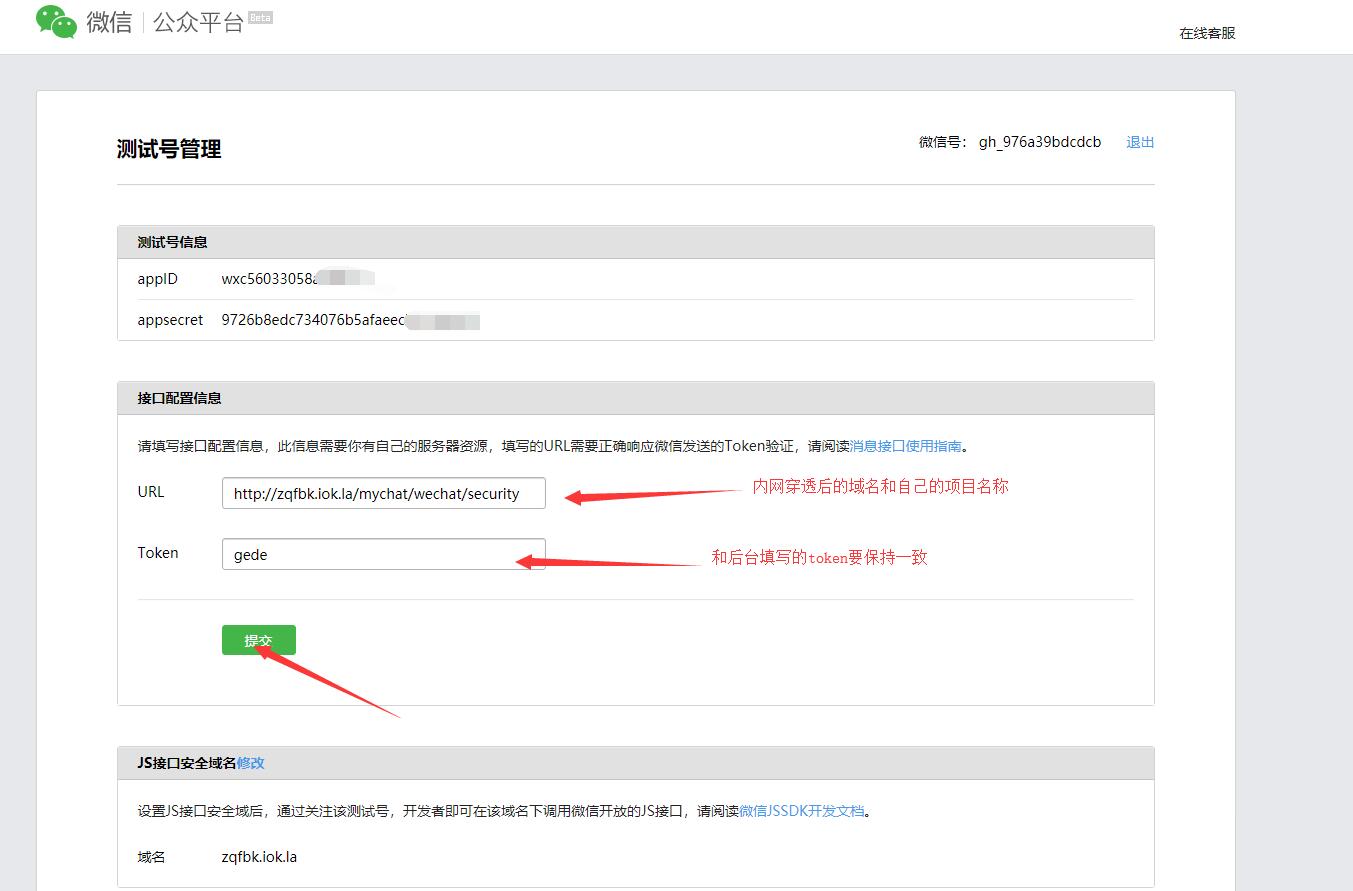
<p style="margin: 1.25em 0; line-height: 1.9; font-size: 16px; color: #222222; text-align: justify; letter-spacing: 0.02em;”>
<p style="margin: 1.25em 0; line-height: 1.9; font-size: 16px; color: #222222; text-align: justify; letter-spacing: 0.02em;”>2545&fm=253&fmt=JPEG&app=138&f=JPEG?w=549&h=500″ alt=”java微信公众平台开发”/ style=”max-width: 100%; height: auto; display: block; margin: 1.8em auto; border-radius: 10px; box-shadow: 0 4px 20px rgba(74,28,144,0.15);”>
<p style="margin: 1.25em 0; line-height: 1.9; font-size: 16px; color: #222222; text-align: justify; letter-spacing: 0.02em;”>3、当我们点击提交时,发现提交失败。原因是之前忘记配置Java微信公众平台开发(一)–接入微信公众平台,在准备工作中我们只是开启了功能,现在我们开始配置
<p style="margin: 1.25em 0; line-height: 1.9; font-size: 16px; color: #222222; text-align: justify; letter-spacing: 0.02em;”>在我们项目的src 下,新增.xml配置文件。开启mvc,并指明mvc扫描包,代码如下:
<p style="margin: 1.25em 0; line-height: 1.9; font-size: 16px; color: #222222; text-align: justify; letter-spacing: 0.02em;”>
<span style="color: rgba(0, 0, 255, 1)"><?<span style="color: rgba(255, 0, 255, 1)">xml version="1.0" encoding="UTF-8"<span style="color: rgba(0, 0, 255, 1)">?>
<span style="color: rgba(0, 0, 255, 1)"><beans <span style="color: rgba(255, 0, 0, 1)">xmlns<span style="color: rgba(0, 0, 255, 1)">="http://www.springframework.org/schema/beans"<span style="color: rgba(255, 0, 0, 1)">
    xmlns:xsi<span style="color: rgba(0, 0, 255, 1)">="http://www.w3.org/2001/XMLSchema-instance"<span style="color: rgba(255, 0, 0, 1)">
    xmlns:p<span style="color: rgba(0, 0, 255, 1)">="http://www.springframework.org/schema/p"<span style="color: rgba(255, 0, 0, 1)">
    xmlns:context<span style="color: rgba(0, 0, 255, 1)">="http://www.springframework.org/schema/context"<span style="color: rgba(255, 0, 0, 1)">
    xmlns:mvc<span style="color: rgba(0, 0, 255, 1)">="http://www.springframework.org/schema/mvc"<span style="color: rgba(255, 0, 0, 1)">
    xsi:schemaLocation<span style="color: rgba(0, 0, 255, 1)">="http://www.springframework.org/schema/mvc http://www.springframework.org/schema/mvc/spring-mvc-4.1.xsd
        http://www.springframework.org/schema/beans http://www.springframework.org/schema/beans/spring-beans-4.1.xsd
        http://www.springframework.org/schema/context http://www.springframework.org/schema/context/spring-context-4.1.xsd"<span style="color: rgba(0, 0, 255, 1)">>
    <span style="color: rgba(0, 0, 255, 1)"><mvc:annotation-driven<span style="color: rgba(0, 0, 255, 1)">></mvc:annotation-driven<span style="color: rgba(0, 0, 255, 1)">>
    <span style="color: rgba(0, 0, 255, 1)"><mvc:default-servlet-handler<span style="color: rgba(0, 0, 255, 1)">/>
    <span style="color: rgba(0, 0, 255, 1)"><context:component-scan <span style="color: rgba(255, 0, 0, 1)">base-package<span style="color: rgba(0, 0, 255, 1)">="com.gede.wechat.controller"<span style="color: rgba(0, 0, 255, 1)">></context:component-scan<span style="color: rgba(0, 0, 255, 1)">>
    <span style="color: rgba(0, 0, 255, 1)"><bean <span style="color: rgba(255, 0, 0, 1)">id<span style="color: rgba(0, 0, 255, 1)">="viewResolver"<span style="color: rgba(255, 0, 0, 1)">
        class<span style="color: rgba(0, 0, 255, 1)">="org.springframework.web.servlet.view.InternalResourceViewResolver"<span style="color: rgba(0, 0, 255, 1)">>
        <span style="color: rgba(0, 0, 255, 1)"><property <span style="color: rgba(255, 0, 0, 1)">name<span style="color: rgba(0, 0, 255, 1)">="prefix"<span style="color: rgba(255, 0, 0, 1)"> value<span style="color: rgba(0, 0, 255, 1)">="/WEB-INF/"<span style="color: rgba(0, 0, 255, 1)">></property<span style="color: rgba(0, 0, 255, 1)">>
        <span style="color: rgba(0, 0, 255, 1)"><property <span style="color: rgba(255, 0, 0, 1)">name<span style="color: rgba(0, 0, 255, 1)">="suffix"<span style="color: rgba(255, 0, 0, 1)"> value<span style="color: rgba(0, 0, 255, 1)">=".jsp"<span style="color: rgba(0, 0, 255, 1)">></property<span style="color: rgba(0, 0, 255, 1)">>
    <span style="color: rgba(0, 0, 255, 1)"></bean<span style="color: rgba(0, 0, 255, 1)">>
<span style="color: rgba(0, 0, 255, 1)"></beans<span style="color: rgba(0, 0, 255, 1)">>
<p style="margin: 1.25em 0; line-height: 1.9; font-size: 16px; color: #222222; text-align: justify; letter-spacing: 0.02em;”>4、再打开我们的web.xmljava微信公众平台开发,添加.xml的扫描。
<p style="margin: 1.25em 0; line-height: 1.9; font-size: 16px; color: #222222; text-align: justify; letter-spacing: 0.02em;”>
<span style="color: rgba(0, 0, 255, 1)"><?<span style="color: rgba(255, 0, 255, 1)">xml version="1.0" encoding="UTF-8"<span style="color: rgba(0, 0, 255, 1)">?>
<span style="color: rgba(0, 0, 255, 1)"><web-app <span style="color: rgba(255, 0, 0, 1)">xmlns:xsi<span style="color: rgba(0, 0, 255, 1)">="http://www.w3.org/2001/XMLSchema-instance"<span style="color: rgba(255, 0, 0, 1)"> xmlns<span style="color: rgba(0, 0, 255, 1)">="http://java.sun.com/xml/ns/javaee"<span style="color: rgba(255, 0, 0, 1)"> xsi:schemaLocation<span style="color: rgba(0, 0, 255, 1)">="http://java.sun.com/xml/ns/javaee http://java.sun.com/xml/ns/javaee/web-app_3_0.xsd"<span style="color: rgba(255, 0, 0, 1)"> version<span style="color: rgba(0, 0, 255, 1)">="3.0"<span style="color: rgba(0, 0, 255, 1)">>
  <span style="color: rgba(0, 0, 255, 1)"><display-name<span style="color: rgba(0, 0, 255, 1)">>mychat<span style="color: rgba(0, 0, 255, 1)"></display-name<span style="color: rgba(0, 0, 255, 1)">>
  <span style="color: rgba(0, 0, 255, 1)"><listener<span style="color: rgba(0, 0, 255, 1)">>
    <span style="color: rgba(0, 0, 255, 1)"><listener-class<span style="color: rgba(0, 0, 255, 1)">>org.springframework.web.context.ContextLoaderListener<span style="color: rgba(0, 0, 255, 1)"></listener-class<span style="color: rgba(0, 0, 255, 1)">>
  <span style="color: rgba(0, 0, 255, 1)"></listener<span style="color: rgba(0, 0, 255, 1)">>
  <span style="color: rgba(0, 0, 255, 1)"><context-param<span style="color: rgba(0, 0, 255, 1)">>
    <span style="color: rgba(0, 0, 255, 1)"><param-name<span style="color: rgba(0, 0, 255, 1)">>contextConfigLocation<span style="color: rgba(0, 0, 255, 1)"></param-name<span style="color: rgba(0, 0, 255, 1)">>
    <span style="color: rgba(0, 0, 255, 1)"><param-value<span style="color: rgba(0, 0, 255, 1)">>classpath:applicationContext.xml<span style="color: rgba(0, 0, 255, 1)"></param-value<span style="color: rgba(0, 0, 255, 1)">>
  <span style="color: rgba(0, 0, 255, 1)"></context-param<span style="color: rgba(0, 0, 255, 1)">>

  <span style="color: rgba(0, 0, 255, 1)"><servlet<span style="color: rgba(0, 0, 255, 1)">>
      <span style="color: rgba(0, 0, 255, 1)"><servlet-name<span style="color: rgba(0, 0, 255, 1)">>appServlet<span style="color: rgba(0, 0, 255, 1)"></servlet-name<span style="color: rgba(0, 0, 255, 1)">>
        <span style="color: rgba(0, 0, 255, 1)"><servlet-class<span style="color: rgba(0, 0, 255, 1)">>org.springframework.web.servlet.DispatcherServlet<span style="color: rgba(0, 0, 255, 1)"></servlet-class<span style="color: rgba(0, 0, 255, 1)">>
        <span style="color: rgba(0, 0, 255, 1)"><init-param<span style="color: rgba(0, 0, 255, 1)">>
            <span style="color: rgba(0, 0, 255, 1)"><param-name<span style="color: rgba(0, 0, 255, 1)">>contextConfigLocation<span style="color: rgba(0, 0, 255, 1)"></param-name<span style="color: rgba(0, 0, 255, 1)">>
            <span style="color: rgba(0, 0, 255, 1)"><param-value<span style="color: rgba(0, 0, 255, 1)">>
            classpath:appServlet.xml
            <span style="color: rgba(0, 0, 255, 1)"></param-value<span style="color: rgba(0, 0, 255, 1)">>
        <span style="color: rgba(0, 0, 255, 1)"></init-param<span style="color: rgba(0, 0, 255, 1)">>
      <span style="color: rgba(0, 0, 255, 1)"><load-on-startup<span style="color: rgba(0, 0, 255, 1)">>1<span style="color: rgba(0, 0, 255, 1)"></load-on-startup<span style="color: rgba(0, 0, 255, 1)">>
  <span style="color: rgba(0, 0, 255, 1)"></servlet<span style="color: rgba(0, 0, 255, 1)">>
<p style="margin: 1.25em 0; line-height: 1.9; font-size: 16px; color: #222222; text-align: justify; letter-spacing: 0.02em;”>
<span style="color: rgba(0, 0, 255, 1)"></web-app<span style="color: rgba(0, 0, 255, 1)">>
<p style="margin: 1.25em 0; line-height: 1.9; font-size: 16px; color: #222222; text-align: justify; letter-spacing: 0.02em;”>5、这个时候我们再次重启本地服务器,然后提交接口配置信息就大功告成了。
1. 本站所有资源来源于用户上传和网络,如有侵权请联系站长!
2. 分享目的仅供大家学习和交流,您必须在下载后24小时内删除!
3. 不得使用于非法商业用途,不得违反国家法律。否则后果自负!
4. 本站提供的源码、模板、插件等等其他资源,都不包含技术服务请大家谅解!
5. 如有链接无法下载、失效或广告,请联系站长处理!
6. 本站不售卖代码,资源标价只是站长收集整理的辛苦费!如果您喜欢该程序,请支持正版软件,购买注册,得到更好的正版服务。
7. 站长QQ号码 2205675299
资源库 - 资源分享下载网 » Java微信公众平台开发(一)–接入微信公众平台

常见问题FAQ
- 关于资源售价和售后服务的说明?
- 代码有没有售后服务和技术支持?
- 有没有搭建服务?
- 链接地址失效了怎么办?
- 关于解压密码